What Is This?
The body of the HTTP response you’re viewing is HTML generated by a Next.js server running on Heroku app exported to Cloudflare Pages and a Cloudflare Worker. The table below lists all the HTTP headers that were included in your request.
| HTTP Header |
|---|
We can confirm traffic is proxied using the Cloudflare dashboard and we can see cf-* headers in the table above.
Secure Communication Between Your Browser and Cloudflare
The communication between your broswer and Cloudflare is encrypted. The encryption is enabled using two settings in the Cloudflare dashboard:
- Edge Certificates
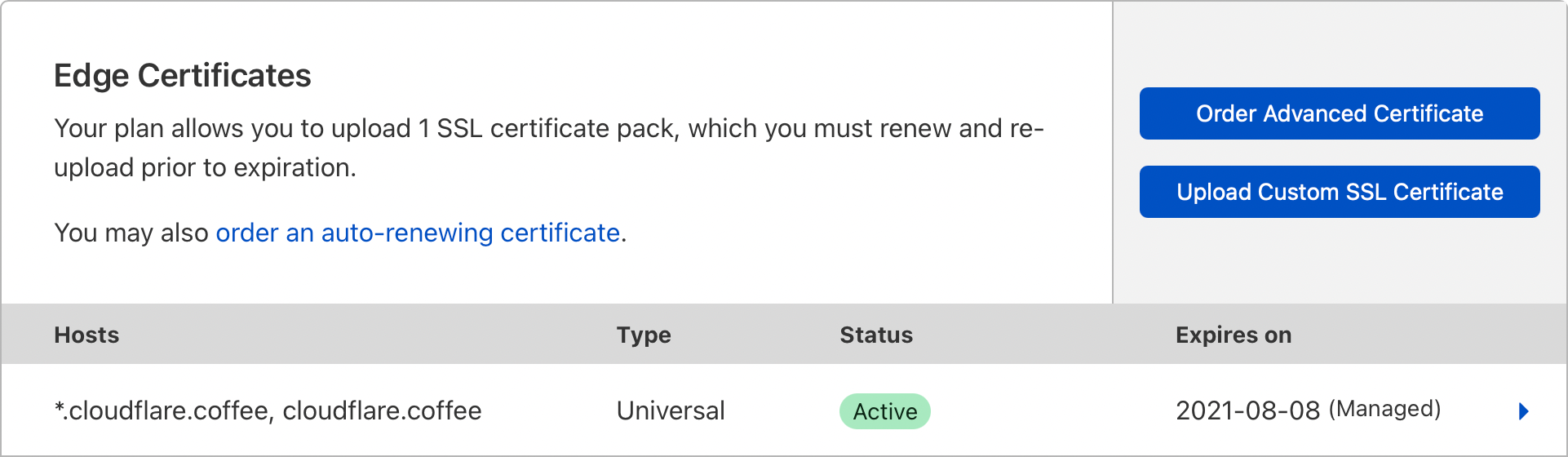
- Always Use HTTPS

Secure Communication Between Cloudflare and the Origin Server
If you visit this site using the URL https://web-dyno.cloudflare.coffee, the communication between Cloudflare and the Origin Server is encrypted. The encryption is enabled using the Full encryption mode in the Cloudflare dashboard, taking advantage of the certificate provided by Heroku.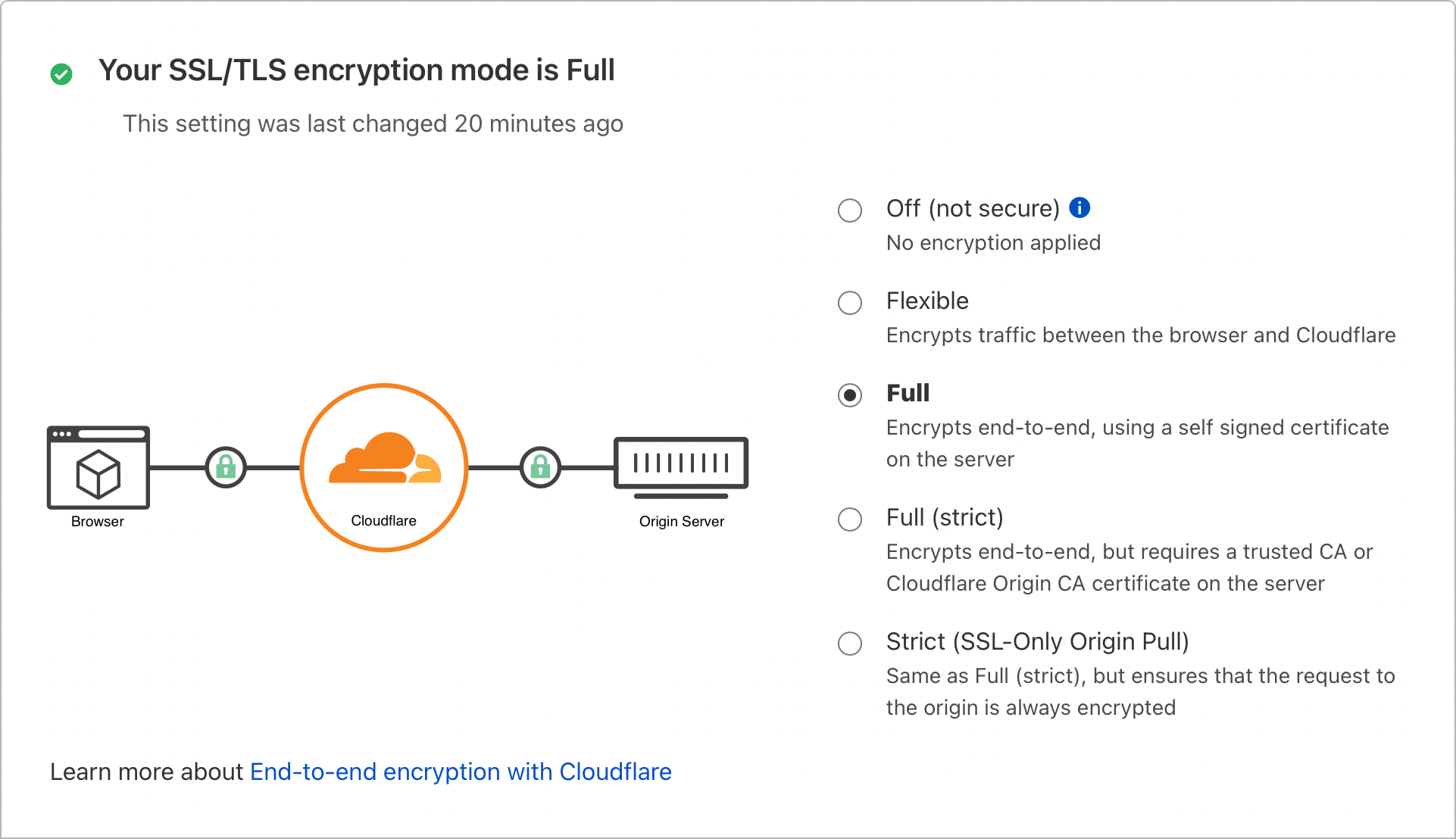
Communication Between Cloudflare and the Origin Server Using an Argo Tunnel
If you visit this site using the URL https://www.cloudflare.coffee, the communication between Cloudflare and the Origin Server is protected by an Argo Tunnel.
The tunnel is created by running cloudflared on a Heroku dyno that cannot receive inbound HTTP requests. cloudflared is installed using a Heroku buildpack that downloads the cloudflared binary and applies the certification and configuration files from secure Heroku environment variables.
#!/bin/sh

build_dir=$1
env_dir=$3
working_dir=`pwd`

# Download cloudflared. It will be at /app/vendor/cloudflared on dyno
wget -q https://bin.equinox.io/c/VdrWdbjqyF/cloudflared-stable-linux-amd64.tgz
mkdir -p $build_dir/vendor
tar -C $build_dir/vendor -xzf cloudflared-stable-linux-amd64.tgz
# Add cloudflared to PATH
mkdir -p $build_dir/.profile.d
echo 'PATH=$PATH:$HOME/vendor' > $build_dir/.profile.d/cloudflared.sh
# Pull config from ENV
mkdir -p $build_dir/.cloudflared
cp $env_dir/TUNNEL_CERT $build_dir/.cloudflared/cert.pem
tunnel_id=`cat $env_dir/TUNNEL_ID`
cp $env_dir/TUNNEL_CONFIG $build_dir/.cloudflared/${tunnel_id}.json
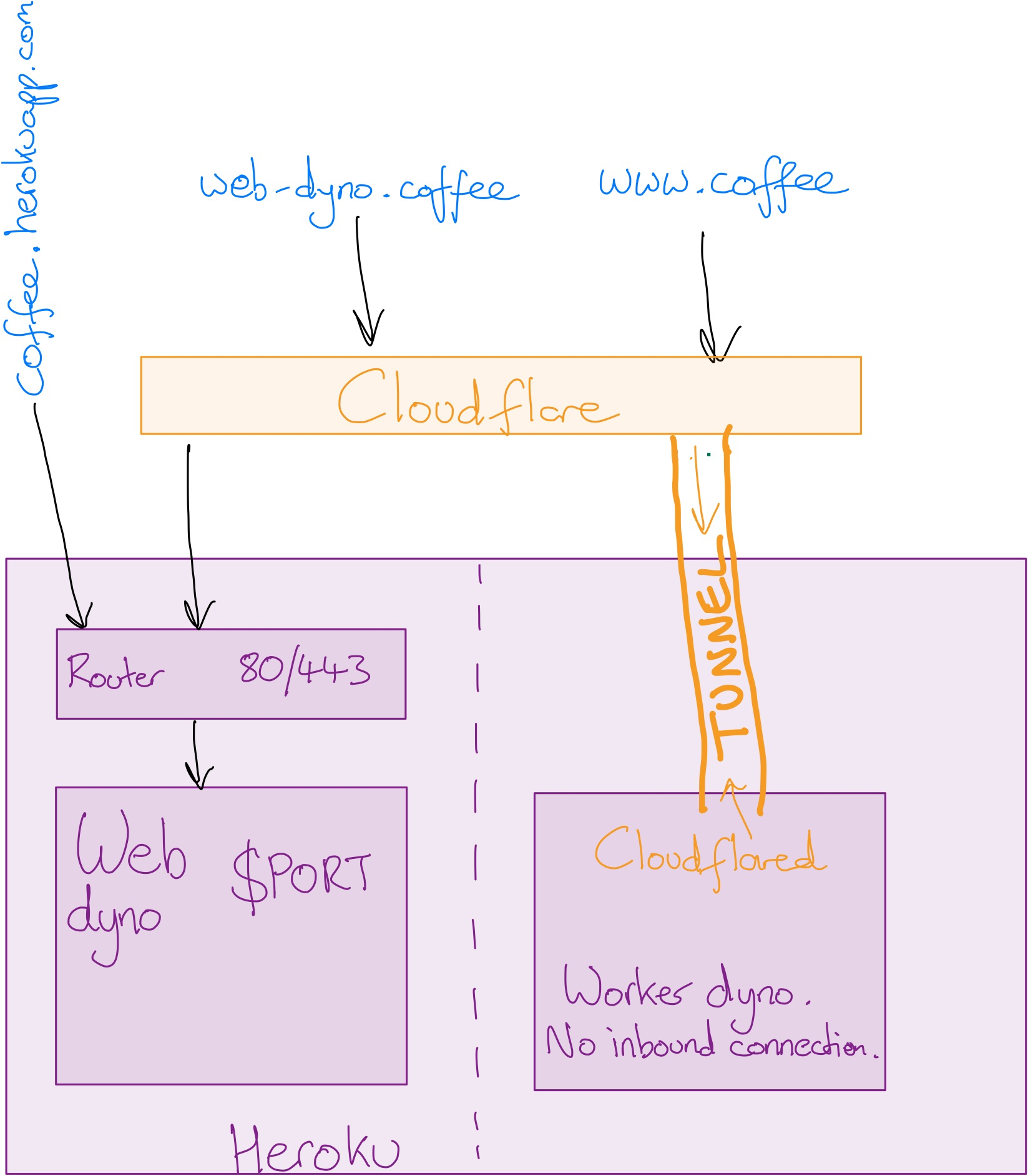
As shown in the diagram below, there are three ways to reach this page:
- https://cloudflare-coffee.herokuapp.com
This URL does not go via Cloudflare. You can verify this because there are no
cf-*headers listed at the top of the page. The page is served from a web dyno. - https://web-dyno.cloudflare.coffee
This URL is via Cloudflare as described above. The page is served from a web dyno.
- https://www.cloudflare.coffee
This URL is via Cloudflare using an Argo tunnel. The advantage of this method is the web dyno can be turned off, removing as https://cloudflare-coffee.herokuapp.com as an attack vector. Note the
cf-cloudflared-proxy-tunnel-hostnameheader confirming the tunnel is in use.
Cloudflare Worker
See a page served via a Cloudflare worker.
Secure Page
An email account at the domain @cloudflare.com or @j4e.name is required to access the secure page.
Note: it is possible to side-step this protection because this demo allows access via the herokuapp.com domain.
Summary
How Could This Be Improved?
Our site is secure and performant:
- The Argo tunnel avoids the need to run our app on the herokuapp.com domain;
- Image assets are cached at the edge by Cloudflare; and
- The tunnel provides Argo Smart Routing to minimise network congestion.
However, every request we make requires a trip to North Virginia because that’s where the compute that renders the request headers happens. For a user in Harrogate, the images can be served by a Cloudflare cache in Manchester but the HTML requires a 7,000 mile round trip!
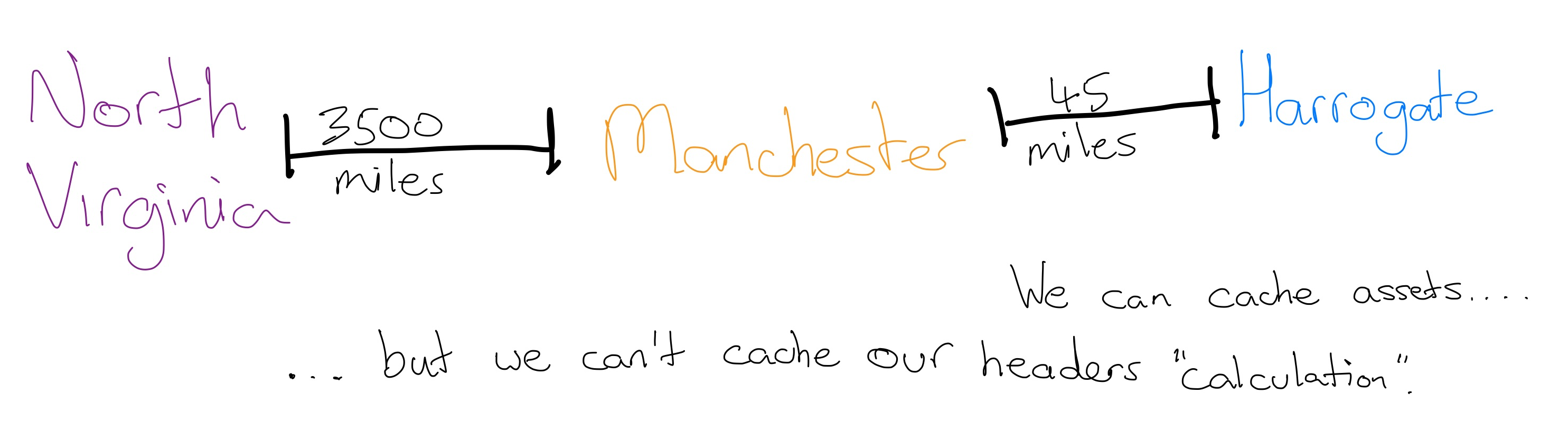
A more performant solution would be to use Cloudflare Pages in combination with a Cloudflare Worker. Because this is a Next.js application, it can be exported as static HTML, making it compatible with Cloudflare Pages. The dynamic element of the page (the request headers) could be added to the HTML using the Cloudflare Worker HTMLRewriter Runtime API.
🆕 here’s more detail.
Learnings
My main learnings from this project are:
- Cloudflare greatly simplifies the process of setting up certificates and security;
- Cloudflare Access Policies are a powerful way to secure content on the web without having to add any security or authentication logic into your app’s source code, provided you take care with the host names serving your app;
- It is possible to use Argo tunnels with PaaS, such as Heroku; and
- Cloudflare Pages and Workers are the “Edge” future for many apps, because of the security and performance they provide.
Source Code
- This app is published at https://github.com/michrome/cloudflare-coffee
- The
cloudflaredbuildpack is published at https://github.com/michrome/heroku-buildpack-cloudflared